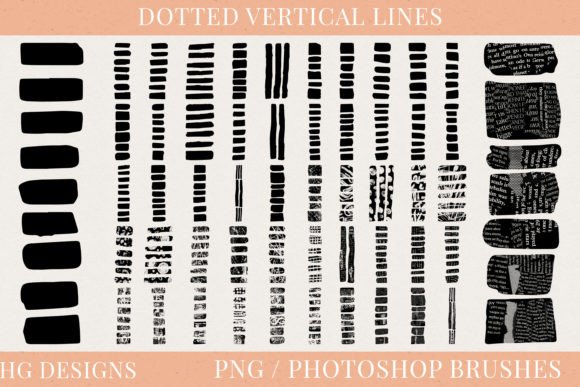
Dotted Vertical Lines Photoshop Brushes: A Designer's Guide
When you're deep in a project, searching for that one element to add rhythm, structure, or subtle visual interest, the right asset can save hours of manual work. Dotted Vertical Lines Photoshop Brushes are one of those unsung heroes in a designer's toolkit. This collection of 50 distinct dotted vertical lines, each a high-resolution PNG file at 300dpi and 5000 pixels tall, also consolidated into a single .abr brush file, offers a surprising amount of versatility. Forget the hassle of drawing perfect, evenly-spaced dots by hand. These brushes provide instant, clean, and consistent line work that can elevate a design from flat to dynamic.
The visual character of these lines is inherently geometric and rhythmic. They introduce a sense of movement and direction without the heavy visual weight of a solid rule. Each dotted vertical line acts as a gentle guide for the eye, creating implied columns, separating content with grace, or adding a layer of texture and pattern. Their personality is flexible: in a minimalist layout, they feel modern and clean; in a vintage-inspired piece, they can evoke the feel of old ledger paper or dot matrix printing. The overall appeal lies in their ability to be both a structural element and a decorative detail, seamlessly blending into a brand identity or standing out as a feature in editorial design.
Where These Brushes Truly Shine
Thinking beyond the obvious is key. While they're perfect for creating borders or dividers in web design, their potential is vast. For packaging design, a field of dotted vertical lines can simulate texture, suggest the weave of fabric, or create a retro pattern for a product label. In social media graphics, use them to frame a text post, create a unique background pattern for a quote, or design eye-catching story templates. They are fantastic for creating custom printable paper crafts—think junk journal backgrounds, collage elements, or decoupage papers. Sublimation artists will find them invaluable for adding intricate line patterns to mugs, apparel, or home decor items that would be tedious to create manually.
The practical applications extend directly into commercial projects. A blogger could use these dotted lines to create consistent, branded dividers between sections of a newsletter or a PDF guide. A small business owner designing their own logo design might incorporate a subtle dotted line as a secondary graphic element to reinforce a sense of precision or connectivity. For marketers, these lines can structure information in infographics or annual reports, improving visual hierarchy and making dense data more approachable. The 300dpi resolution and tall pixel height ensure they remain crisp and professional even in large-format prints or high-resolution digital displays.
Integrating Dotted Lines Into Your Design Workflow
So, how do you choose and use these design assets effectively? Start by evaluating the project's tone. A tech startup's website might use thin, evenly spaced dotted lines for a clean, digital feel. A children's brand might opt for thicker, more irregular dots for a playful touch. Test how the line's weight and dot spacing interact with your primary typeface. A delicate dotted line pairs well with a light sans serif font or an elegant script font, while a bolder line can hold its own next to a strong display font or a sturdy serif font.
Load the .abr brush file once, and you have 50 variations at your fingertips in Photoshop's brush panel. This allows for quick experimentation. Try varying the opacity or blending modes to see how the lines interact with photographs or colored backgrounds. Use them as a clipping mask to fill text or shapes with a dotted pattern. The key is to use them intentionally, not as an afterthought. They should serve the composition—guiding the viewer's eye, creating balance, or adding a layer of sophisticated detail that enhances the overall professionalism of the piece.
From a practical standpoint, this set functions as a highly specialized creative font or asset kit. While not a traditional typeface, it follows similar principles of consistency and style. When using them in commercial work, always verify the licensing terms to ensure they cover your intended use, whether for client projects, merchandise, or digital products. The real value of Dotted Vertical Lines Photoshop Brushes lies in their ability to solve specific design problems quickly and beautifully, making them a smart addition to any designer's resource library for both personal and professional work.